25
VFP9Focus
Filed Under (Random.links, Visual FoxPro) by WildFire on 25-09-2004
PDF-link/download-warp: VFP9Focus.pdf from CoDe Magazine.
Bill Gates and Petals Around The Rose. (You have encountered that puzzle already… right?)
25
PDF-link/download-warp: VFP9Focus.pdf from CoDe Magazine.
Bill Gates and Petals Around The Rose. (You have encountered that puzzle already… right?)
20
Darn. I can’t work without my costume.
We visited a new client this afternoon. We’ll visit an old client tomorrow. On Wednesday we will visit another new client and another new one on Thursday or Friday depending on the schedule we will set after Wednesday’s visit.
Let’s not even talk about Saturday.
This is something I haven’t anticipated when I dived into the freelance world. That there are instances I would be spending more time visiting clients than coding stuff in front of the PC.
Not that I’m regretting things… it is just that it’s so time consuming. Plus… the travel alone renders the late night after a visit too tiring to code.
Anyway… here are some foxpro-warps: Walking on Cloud 9.0 of Visual FoxPro and The Kit Box: Knock, Knock! Who’s There? (via Alex Feldstein and Andrew MacNeill‘s blogs)
15
This is a screenshot of the prototype of a new project of ours.
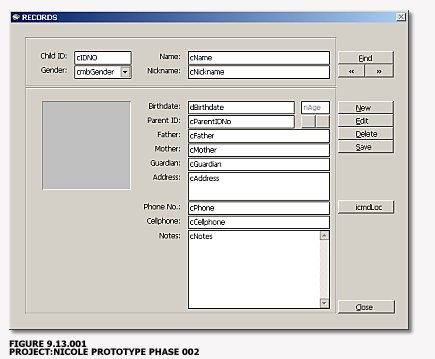
To a give you a short overview it is a database program that monitors the children records in a certain place where parents can ‘safely’ leave their children so they can shop with comfort and peace of mind.
These children will then unite with the other ‘temporarily abandoned’ children in that place to battle the forces of evil and squash the invading twelve-headed-iodine-squirting aliens while their parents comfortably shop for shoes and perfumes.
(How I wish someone would come up with the idea for something like this where instead of children, the husbands are the main clients while their lovely wives do the shopping thing… (I would even wholeheartedly create a database program for free if that business pops up))
Some of these children obviously do not win in this enormous battle so a database program is needed to monitor who came back ‘alive’ and who came back ‘replaced’. The TimeIn and TimeOut records of these brave kids are necessary to compute the wormhole coordinates use for their battle portals.
Let us leave those alien battle-invasion details for now and proceed.
If you can remember I posted this yesterday:
If you are to choose between the second level of data normalization or an easier usable interface, what would you prioritize?
Going back to the prototype screenshot above, you see a very simple interface. There are textboxes and combo boxes for the regular information this application needs: ChildIDNO, ChildName, Nickname, Birthdate, FatherName, MotherName, Guardian, ParentsAddress, ParentsPhoneNumber to name a few.
Easy flowing, right?
Probably yes… IF you’re creating something and don’t give an aliens arse after you get paid. If you’re one of those irresponsible ‘database dudes’ out there who deserve to be devoured by sex-cravin’-tentacle-infested aliens.
If you choose the easy path you’ll get a lame database that looks like this (let’s just select the important fields):
| _KIDS DATABASE | ||||||||||||||||||||
|
That is even the picture in the best case scenario. Re-entering the parent data again for another kid with the same parents would yield possible errors… extra spaces and more open for typo-related errors.
| For example: | Foo, John R. |
| Can be entered as: | Foo, John |
| Foo, John R | |
| Foo, John _R. (an extra space) | |
| Foo, Jonh R. (and countless versions of typos) |
If Child_001 and Child_002 are even encoded to the database a number of days apart, the possibility of an error to occur increases. (Let’s say after a month when the second child, learning that one of his sibling was abducted, pledges to go on in a quest to rescue his big brother from aliens.)
(By the way… one of the target readers for these blogs of mine are the ComSci/IT students of our country who needs ‘database enlightenment’; for those who have been experts of this field already, you are free to move your arse out of here (for now) and read other more advanced stuff instead… probably about Source Control HowTo or How windows exploit the hyperthreading technology.)
Now if you’ll look back to the fields above, ParentID, FatherName and MotherName, ParentAddress, ParentsPhone and the other Parents-related information are redundant. A definite no no in the area of database structure planning.
So the first ‘level’ of improvement on this is to create a separate database for Kids and a different database for Parents. Something like this:
| _KIDS DATABASE | ||||||||||||||||||||
|
| _PARENTS DATABASE | ||||||||||||||||||||
|
The KIDS database holds fields that are related to… well kids and the PARENTS database for PARENTS-related information such as contact number and the likes.
Now… is that enough improvement and normalization already..?
While it is better than the first table it is not that good enough yet. You can still see redundant records in the PARENTS table.
You can improve this further by creating another field PARENTS_ID on the KIDS table linked to the same field in the PARENTS table.
| _KIDS DATABASE | ||||||||||||||||||||
|
| _PARENTS DATABASE | |||||||||||||||
|
Now is this fine already..?
Better than the first and second approaches but you can still improve things more.
Also… notice that Child_002 disappeared in this scheme.
But I’ll end things here for now and we’ll continue this series on another post which will include the solution.
I also have to tackle yet the issue I posted above, the issue between Data Normalization and a more usable interface. That too on the continuation of this post.
12
Today is the 256th day of the year… Programmer’s Day for leap years.
Programmer’s Day is a whimsical “holiday” on the 256th day of the year celebrated mostly by computer programmers. The reason for this is that 256 is equal to 2 to the power of 8, which is equal to the number of values that it is possible to represent in a byte of data. Traditions include drinking, acting silly, coding silly programs, mini computer games, playing with old computers, etc.
Programmer’s Day usually falls on September 13th; on leap years, it is September 12th, due to the addition of February 29th into the calendar.
Source: Wikipedia.org
Ten years ago… it was also on this date that Netscape Navigator was released.
Steve Gillmore: Allchin’s last stand? Looks like these articles derived from Longhorn’s component split up will never end, eh?
VFUG September 2004 Newsletter is out.
11
Foxpro Advisor Magazine now offers rss feeds. They just released Issue 2004 Week 37 too.
Now if only we can roll back to those times when everything in the ‘net is virtually free…
06
Foxpro-resource link: Fastwrite.com. Don’t forget to check the Resources and Downloads section.
How about some RSS Feeds, NeuronsBehindFastwrite.com?
04
03
One of my source of information when I’m doing research is Fox.wikis.com which comes with an RSS Feed by the way. Here are some of the latest updated wikis from that site:
This snippet info-vault of mine is getting huge. I really need to finish that Snippet Organizer project of mine.
03
Time travels too fast indeed. It was like days ago when I posted VFP’s August 2004 Newsletter. Now comes Ken Levy’s September 2004 – Letter from the Editor.
Although I claim not to belong in that pool of humans with irrational desire to upgrade to the latest software version of their choice, I am really looking forward for this ninth version.
01
Cathy Pountney posted two VFP9 report related articles at MSDN: What’s New in the Visual FoxPro 9.0 Report Writer and Visual FoxPro 9.0 Report Writer In Action.
Since I was a kid, I have always been fascinated with illusions. Here’s one. Probably I’ll be posting more illusion-related pictures/artworks from now on.
Besides… “life is an illusion… peel one layer… another one will reveal”.
30
MSDN . MSDN Library . Visual Tools and Languages . Visual Foxpro
26
Code Dump: the time where you take a break from your programming related tasks to talk about your programming related tasks.
In PROJECT::SOPHIEAI (IUMS: Internet Usage Monitoring System), USAGE.dbf holds the records that stores the log-in/log-off information of the users of a certain internet lab/cafe at a given time and space. Along with the IDNO number of the user of course and some other fields.
Violating the second rule of normalization (or was it the third rule), I also included the TotalNumberofHoursUsed per usage and the TotalFee paid.
If you follow strictly the normalization rules, you know that you don’t have to include in the database fields that can be derived from two or more fields that are already in the database.
For example if your database has fields named Field01 and Field02 with sample values 10 and 618 respectively, you don’t need a Field03 which will store 628, the total of Field01 + Field02. Normalization rule will then call you moronic and consider you an outcast of the database programming world.
You deserve to be eaten alive by vultures.
You deserve a punishment such as watching Barney re-runs again and again.
But in some cases, yes… believe me… there are times when you have to violate and override this rule. These are the cases when speed-related principles are far more important. Plus… considering that these days hard disk space is getting cheaper and time (since Mida’s era) is constantly gold, it justifies the normalization override process.
So back to PROJECT::SOPHIEAI.
Now because of some ‘outside factors’ (again), I need a patch that would make a different database, CRED_NET.dbf, which holds the fields TimeLeft and Credit be synchronized with the data USAGE.dbf holds.
Let’s say USAGE.dbf records for student 0001 are (let’s just take the important fields for discussion):
| DATE | IDNO | TotalTime | Fee |
| 20040812 | 0001 | 01:00:00 | 25.00 |
| 20040815 | 0001 | 02:00:00 | 50.00 |
Now CRED_NET on the other hand holds how much is left for a student 0001. There are instances when the values on both databases don’t synchronize. Yes the existence of these databases violate the normalization rule once again but you have read the reasons above already, right?
And can you stop reminding me about normalization rules so we can go on?
So to correct things you execute this untweaked patch (I’ll call it the ‘brute force approach’… ‘Brute’… like ‘Brute Lee’)
select CRED_NET
set order to CCRENAME
do while not eof()
cIDNO = alltrim(CRED_NET.IDNO)
**' ····································
**' SECTOR.007.BEGIN
select USAGE
set order to CUSAIDNO
go TOP
do while not eof()
if alltrim(USAGE.IDNO) == cIDNO
cTimeCount = TimeCalc(cTimeCount, USAGE.TIMETOTAL, 1)
nCreditsTotal = nCreditsTotal + USAGE.FEENET
endif
skip
enddo
**' ····································
**' SECTOR.007.END
select CRED_NET
cTimeReflect = TimeCalc(cTimeCount, '40:00:00', 2)
nCreditsReflect = 800.00 - nCreditsTotal
rlock()
replace CRED_NET.TIMELEFT with cTimeReflect
replace CRED_NET.CREDIT with nCreditsReflect
unlock
skip
enddo
The above code works… of course, but… like any process in this world that involves brute force, it is slow.
Now replace the SECTOR.007 part of the code above with this:
select USAGE
set order to CUSAIDNO
set filter to alltrim(USAGE.IDNO) == cIDNO
go top
do while not eof()
cTimeCount = TimeCalc(cTimeCount, USAGE.TIMETOTAL, 1)
nCreditsTotal = nCreditsTotal + USAGE.FEENET
skip
enddo
You’ll see a HUGE difference in terms of execution speed.
TimeCalc is a function by the way that adds, substracts, multiplies and divides two time variables. Something which I’ll post later. (You can find the basic/raw version inside the Microsoft Help and Support Site though),
Of course when you’re doing these kinds of patches, don’t forget the progress bars. It is a good hypnotic-mechanism for the users to develop this affinity for your software.
CodeDump-20040825.153618.End
Now back to work.
26
Foxpert: Security in FoxPro (Protecting Application and Data). With the advent of tools such as ReFox and UnFoxAll, this whitepaper is a must read. But it includes more topics aside from these decompilers mentioned.
21
West Wind Internet Protocols 4.55 (wwIPStuff) released. The class library supports the following:
Along with that release, is an insightful article: Why West Wind Html Help Builder is NOT a .NET Application.
I’m days behind linking this… Ken Levy posted the August 2004 Visual Foxpro Newsletter which contains a FAQ that answers some of VisualFoxpro-related issues.
Dan Appleman started his blog. His advice for future computer science majors and RAD is not productivity posts are an early favorite of mine… especially the RAD-related one.
So let’s get real. Bad programmers write bad code. Good programmers write good code. RAD lets bad programmers write bad code faster. RAD does NOT cause good programmers to suddenly start writing bad code.
If you can remember, a couple of months ago he enumerated why he refrains from blogging. How I wish those unmovable-arse humans I convinced to blog would also have a change of mind.
While reading Wesner Moise’s blog (.NET Undocumented, one of the first blogs I subscribed to), I found out that KurzweilAI.net now has an RSS feed. I ‘HTTrack-ed’ that site before when I found some very very interesting AI-related articles.
If you are using the HTML version of that site and can’t seem to find the syndication feed link, here’s a direct link to the rss feeds.
More and more programmers who are using VisualFoxpro are coming out in the blogosphere. Here are two links that I have discovered just recently: Craig Bailey and Andrew Coates (not entirely VFP but he mentions VFP once in awhile).
I wonder if it is just me still getting used to waking up around 4AM (I usually sleep around 3AM) or my FireFox browser, that makes the OZ 2004 Speaker section scramble the names and the pictures. It works fine on the IE6 browser though.
Here are some alternative programming fonts. Nice… thanks Vernon Labayog for that link.
18
VisualFoxpro is featured at SD Times. You seldom hear those type of news as of late. Probably the reason why that article is being linked in almost all the Foxpro-related blogs residing in my RSSBandit aggregator.
ADODB 4.52, anyone?
15
Here’s a simple 2:00AM code I made. Its objective is to make a certain combo box automatically reflect the tag names for the databases you are currently using.
with thisform
DatabaseInitialization()
select FILEAREA
nTagCount = tagcount()
dimension aIndex(nTagCount)
for nCount = 1 to tagcount()
if !empty(tag(nCount))
store tag(nCount) to aIndex(nCount)
else
exit
endif
endfor
.cmbIndex.rowsourcetype = 5
.cmbIndex.rowsource = 'aIndex'
.cmbIndex.value = aIndex(1)
endwith
It’s too simple really but this was the first time I used this. I even had to refer to Foxpro’s help file in the formulation process.
The main purpose is to create a template form for the ‘File Utility’ type of modules. The term ‘File Utility’ was something I have acquired from College MacPros (Machine Problems). This is a part of those old DOS based Programs we had back then (created in either Pascal, C/C++, Clipper 5.2) which hold the records for your database-based values, or as one of my clients call it… directories.
This has been a practice which I find useful especially when you’re already in the maintenance mode of your program. Directories like this, however, should be planned in advance. The ‘Design phase’ of your project is a good place to start.
These directories can also be used inside combo boxes, and if in the future you would like to add values that those combo boxes display, you don’t need to touch the hard code. You just either edit the database or use your File Utility module.
Very handy too when your database application is being used by more than one client.
Let’s give an example.
Suppose you have a combo box for Profession. Of course you can choose the combo box builder wizard and enter the data by hand but that would be lame.
Totally lame that only castrated over-boozed programmers of the 60s do that.
You use a database approach and set the combo box to grab the values of that database.
.cmbProf.rowsource = 'DATABASENAME.FIELDNAME'
.cmbProf.rowsourcetype = 6
… where cmbProf is your Profession combo box and 6 stands for (database) fields, the source of the values the combo box will display.
You can also use the Property box to set things. Other sources include value, alias, sql statement, query (.qpr), array, files, structure, popup, DoomPortal, BermudaTriangle, RiverofLesRough and so on.
Now back to the code above (Darn I’m wandering off once again), the algorithm gets the number of tags the compound index file has, gets the tag names and stores them in an array.
Now using the values in that array, you can place the code below in an object (a ‘Browse’ command button perhaps).
select FILEAREA
set order to alltrim(.cmbIndex.value)
.GridProf.refresh
This will reflect the changes you want to view, which in my case is found in a grid that displays the sorted records.

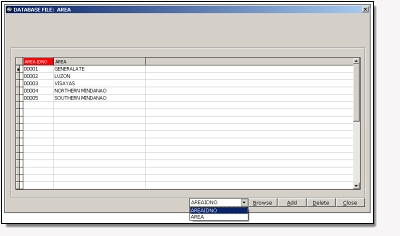
Figure 292.1 Image too shy to enlarge itself since its design and alignment was not optimized yet. Check back later when Image.nConfidenceLevel++.
15
Peculiar things happen once in a while in a programming language IDE and the VisualFoxpro’s IDE is not an exception.
Take this for an example:
close databases
close all
select 0
use FILEAREA shared
if !file('FILEAREA.cdx')
index on NUMTOSTR(AREAIDNO, 5) tag CAREIDNO
index on upper(alltrim(AREA)) tag CAREAREA
endif
Note: UDF NUMTOSTR(5, 3) returns '005'
Note: UDF is 'User Defined Function' (OK... you know that already)
So what is wrong with the above snippet?
Nothing really. In fact I’m using it on a different application and it’s fine. But tonight I’m getting the ‘File must be opened exclusively.’ error message. So I tried transferring it from the .PRG file to the frm.Init, removed the NUMTOSTR line temporarily, executed close all commands inside the command window, closed VisualFoxpro a couple of times and the error is still there.
No other application is using the database and I’m not even connected t0 the internet. (Just in case you’re entertaining that wild idea that someone in cyberspace is playing with my databases tonight)
So I thought ‘FILEAREA’ was an ultra-secret Foxpro reserved word and renamed the database to AREA.
Still, the problem exists.
Another reboot, fired up VisualFoxpro, executed the program and it ran sans the error message this time.
Weird.
So I tried recoding the things I made, re-used the NUMTSTR function, renamed the database back to FILEAREA and placed the code back to the DatabaseInitialization.prg.
Problem’s lost… I can’t even recreate it.
This is one of those weird stuff I encounter once in a while. You can’t even share it to someone whose skills are better than yours since it just disappeared out of nowhere. As a programmer this is quite puzzling. Programmers always have this inner desire to know the why and how of things. Why such thing exists. Why it exists that way.
When you can’t recreate the problem, you can’t prove that the problem isolation procedures you just did were the solution… that you used the right chant and growl frequencies.
You can’t even prove that such problem exists.
Really weird. You just end up storing it somewhere behind some portal deep within your brain…
… or you end up blogging about it.
14
Calvin Hsia: Displaying playing cards for bridge.
14
Here are some VisualFoxpro articles from the Advisor Magazine:
Les Pinter points out the Differences Between Visual FoxPro and Visual Basic .NET (Two parts actually that’s the first part and here’s the second part).
Andrew MacNeill also writes about a new VFP9 feature that can help you lock down VFP Reports, Protect Your Reports With Microsoft Visual FoxPro 9.